EG2 Hybrid W4 Runtime: Cutting Multimodal Embedding GPU Memory to 0.58x
If you need to search text, images, audio and video in one embedding space and your GPU memory is tight, this post is for you. A runtime called eg2-l2v1 keeps the 4-bit media weights in 4 bits on the GPU, and resident memory after loading drops to 0.58x of the BF16 model. It does not make inference faster, and so far it is verified on one GPU type, the NVIDIA B200.
What is EmbeddingGemma 2?
EmbeddingGemma 2 is a multimodal embedding model that Google released under Apache 2.0. It takes text (including code), images, video and audio and maps all of them into the same 768-dimensional vector space. That is what makes cross-media search possible with a single model, such as finding the slide capture that matches a meeting recording. You no longer need the two-step pipeline of captioning images and transcribing audio first, then feeding the text to a text embedder.
The full model has 740M parameters: a 270M text backbone, plus 170M for the vision encoder and 300M for the audio encoder. You can switch on only the encoders you need, for example 270M for text only or 440M for text and images. It supports more than 100 languages, and the input length is 8,192 tokens shared across modalities. Output vectors can be truncated from 768 to 512, 256 or 128 dimensions to cut storage (re-normalize after truncating). The intended uses are search and RAG, classification, clustering and semantic similarity. We covered the model itself in more detail in an earlier post.
This post is about the heavy part: the vision and audio encoders, which account for 470M of the 740M parameters.
What you need to know first
The published model ThakiCloud/eg2-hybrid-w4-media is a checkpoint of EmbeddingGemma 2 in which the text weights stay in BF16 and only the vision and audio weights are quantized to 4 bits. On disk it is 57% of the upstream BF16 repository.
The model card is candid about one catch. The official loader dequantizes the 4-bit weights back to BF16 when it loads them, so memory after loading is the same as the original BF16 model. The checkpoint alone shrinks the download, not the memory you use at run time.
The GitHub runtime ThakiCloud/eg2-l2v1 (v0.1.0) fills that gap. It contains code only and does not redistribute weights. At run time it downloads the public checkpoint at a pinned revision and uses it as is.
In plain terms
Think of packing winter clothes for a trip. The official loader takes the clothes out of their vacuum bags the moment you reach the hotel and hangs all of them in the closet. The closet, which is GPU memory, fills up with the full-size clothes.
eg2-l2v1 leaves the clothes in their vacuum bags. When you need an item, it takes out just that one, unrolls it, and puts it back afterwards. The closet stays much emptier, but the unrolling happens every time, so getting ready takes a little longer. Every result in this post fits that picture.
What changed
The official loader expands every 4-bit vision and audio Linear layer to BF16 at load time. This runtime keeps the 4-bit codes on the GPU and dequantizes a layer’s weights only when that layer is called, then feeds them into a BF16 matrix multiply.
The key point is that this is not a native INT4 GEMM. The multiply is the same BF16 GEMM, and only the way weights are stored has changed. You give up a little throughput to gain memory.
Results
All measurements were taken on a single NVIDIA B200. After loading, resident GPU memory is about 0.9 GB, against about 1.5 GB for the BF16 model, which is 0.58x. Accuracy is almost identical to the official loader: embeddings are effectively the same on synthetic inputs (the minimum cosine similarity is in the caption below), and results were bit-identical on real audio.
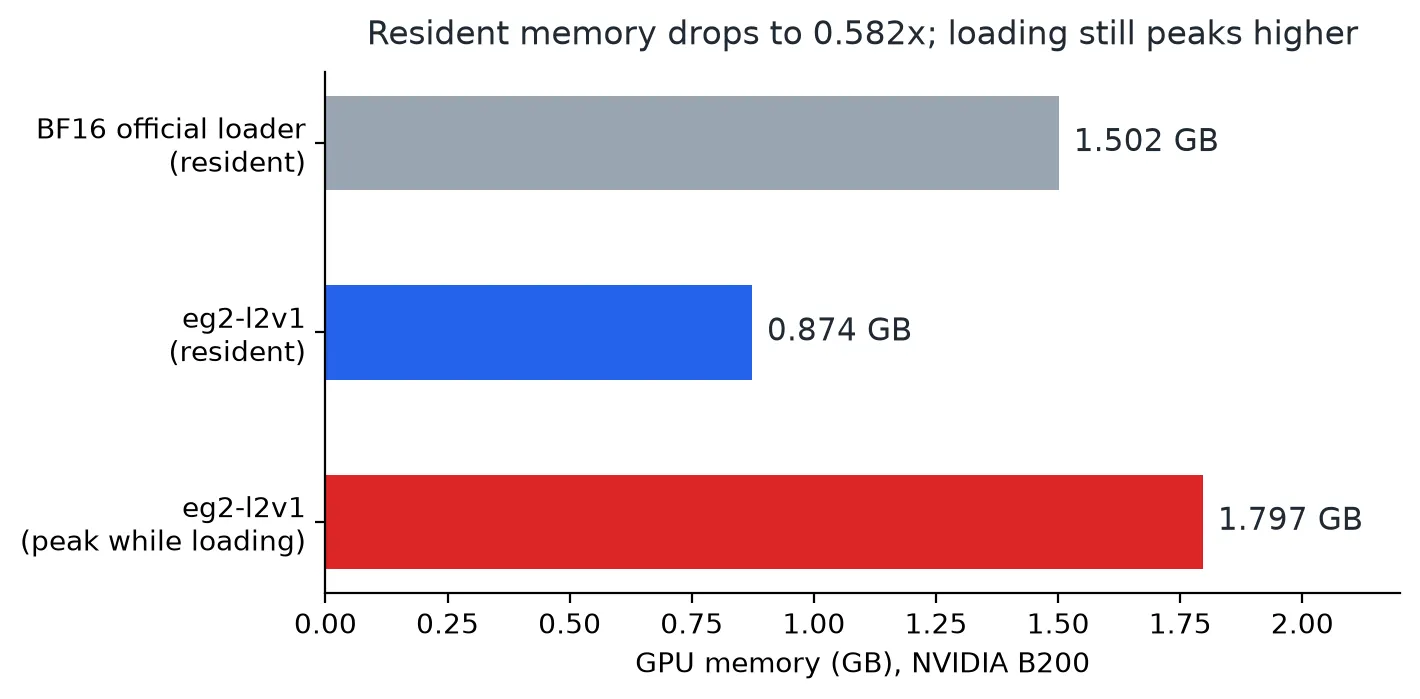 Figure 1. GPU memory on B200. The minimum cosine similarity against the official loader on synthetic inputs is at least 0.9999998. Resident memory drops, but the peak during loading is higher than the BF16 resident size.
One warning. During loading, memory peaks at about 1.8 GB. If you size your budget from the resident figure alone, loading can fail, so leave headroom for that peak when you deploy.
In other words, it takes less room once unpacked, but it needs a wider floor for a moment while unpacking.
Throughput goes down
Throughput is the median of three rounds, alternating with BF16 in the same process. The table shows throughput relative to BF16 on 3-second synthetic inputs.
| Modality | batch 16 | batch 64 |
|---|---|---|
| text | 1.014 | 1.002 |
| image | 0.956 | 0.988 |
| audio | 0.825 | 0.875 |
| video | 0.989 | 0.998 |
Text and video barely change, and audio slows down the most. On real recordings (FSD50K dev, 64 clips per length bucket), audio throughput is 0.83 to 0.94x of BF16.
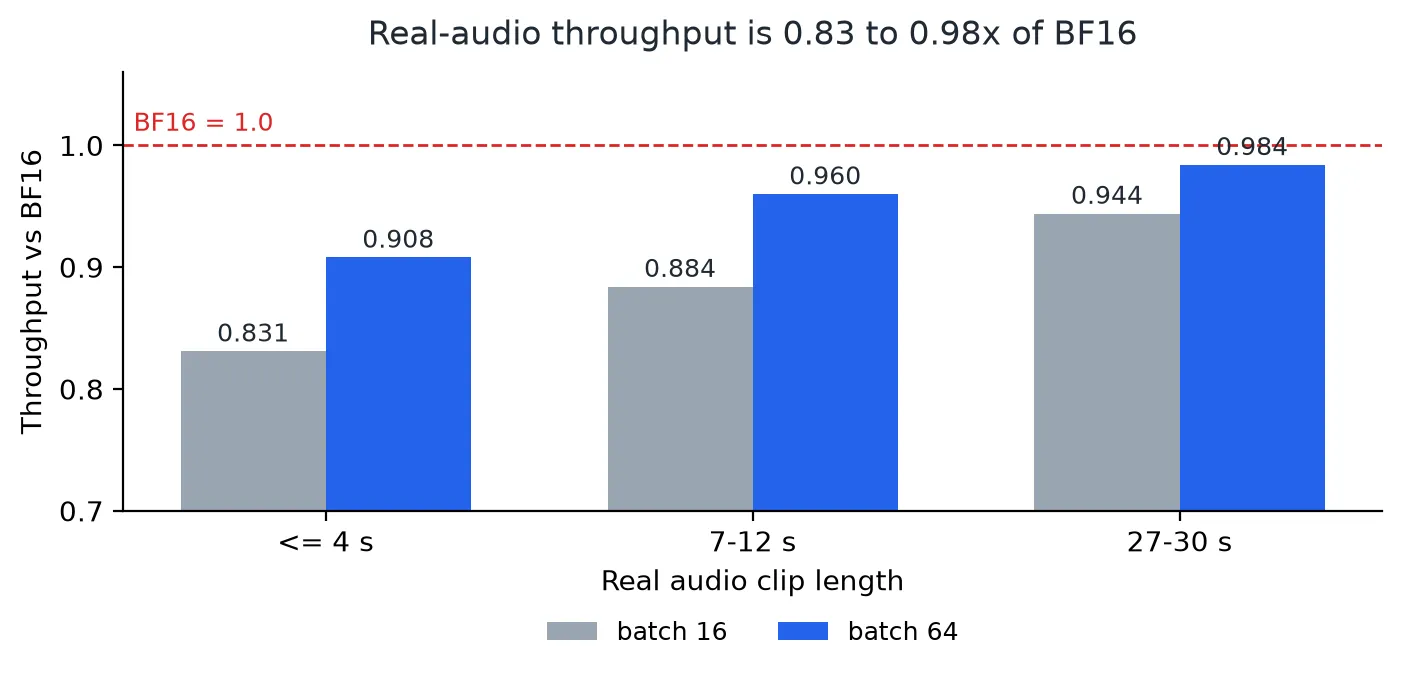 Figure 2. Throughput by real audio clip length (BF16 = 1.0). Short clips and small batches are the worst case.
Short audio is hit hardest, and the gap narrows as clips get longer and batches get larger. Activation memory during the forward pass is the same as BF16: 64 clips of 30 seconds need an extra 6.2 GB. Only the weight memory shrinks.
What about retrieval quality?
L2V1 produced bit-identical embeddings to the public reference loader on the same inputs across all four modalities (selftest in the public-image environment). We did not rerun a separate retrieval benchmark with the L2V1 runtime. The retrieval evaluation below is what the model card measured with the official loader. The card states that image, audio and video retrieval met non-inferiority criteria against BF16 that were fixed in advance. The evaluation data and harness are internal, though, so outsiders cannot reproduce them directly. If your application depends on exact neighbor order, such as deduplication or near-duplicate checks, validate on your own data.
What the smaller footprint buys you
An embedding model rarely has a GPU to itself. The language model that writes answers from search results, a reranker and other services usually share the same card. When the embedding model’s resident share drops from 1.5 GB to 0.87 GB, the freed room goes to three places.
First, you can co-locate more on one GPU, and give that headroom to whatever turns spare memory into throughput, such as a language model’s KV cache. Second, you get room for larger embedding batches. Resident memory went down, but activation memory during the forward pass is the same as BF16 (for example, 6.2 GB extra for 64 clips of 30 seconds), so the saved resident memory becomes batch headroom. Third, when several services share one GPU, the embedding model fits into a smaller slice.
When you size a deployment, budget for the peak during loading, about 1.8 GB, not the resident figure. Only slices larger than that are safe.
Switching cost is low, which matters in practice. Because the embeddings match the official reference loader on the same inputs, a vector index you already built with the official loader stays valid without re-embedding. You can move only the query side to this runtime and still compare in the same space.
How to use it
A few use cases:
- Internal multimodal search. Put documents, slide captures, meeting recordings and short videos into one index and query it with text. The text path stays in BF16, so document search follows the same path as the original model.
- Agent memory retrieval. When agents that handle work on your behalf look for evidence in past documents, screens and voice recordings, this embedding sits underneath. If an agent platform (Paxis) keeps the language model and the embedder on the same GPU, the saved memory becomes headroom for the language model.
- Co-hosting with inference serving. When you add an embedding endpoint next to a language model serving node (Metis), the resident burden is smaller. We have not, however, deployed this checkpoint behind a serving endpoint. What has been verified is loading it directly from Python, as in the example below.
It does not fit in these cases. If GPU memory is not your constraint, the official loader is faster for images and audio. Bulk processing of short audio clips takes the largest throughput hit. Also check first that you are on B200, the only supported GPU.
Try it
git clone https://github.com/ThakiCloud/eg2-l2v1.git && cd eg2-l2v1
bash install.sh
python selftest.py --out result.json     # exit 0 means pass
The install script pins versions with a lock file, and the selftest checks embedding agreement with the official loader and measures memory. Loading and encoding work the same way as the official sentence-transformers usage.
import numpy as np
from huggingface_hub import snapshot_download
import eg2_l2v1

path = snapshot_download("ThakiCloud/eg2-hybrid-w4-media",
                         revision="bc3574a285a2779ac0686cc149342f30fbbf8f5b")
model, info = eg2_l2v1.load(path)      # CUDA only

wav = np.zeros(16000 * 3, dtype=np.float32)          # replace with your 16 kHz mono audio
audio_emb = model.encode([{"audio": wav}], normalize_embeddings=True)
text_emb = model.encode(["a dog barking in the distance"], prompt_name="SearchQuery", normalize_embeddings=True)
print(float(audio_emb @ text_emb.T))
Feed audio as 16 kHz mono float32; clips longer than 30 seconds are truncated to 30 seconds by the model’s processor.
What not to trust
- The only verified GPU is the B200 (SM 10.0). On H200 the median met the same criteria, but one of three rounds measured audio at batch 16 at 0.796, so H200 is not on the supported list.
- It works only with the 4-bit checkpoint. There is no CPU path, so use the official loader on CPU.
- It is not a tool for speed.
- We have not started an inference endpoint on this checkpoint to validate it. Every number in this post comes from the loader and embedding stage.
These are measured values from a single B200, not simulations, and both the code and the model are public under Apache-2.0.