Low Flame, Narrow Door: How an Untouched Server Setting Turned Customers Away
This is worth reading if you run a server that serves AI models, or if you want to cut the bill for one. Here is the short version. Without touching a single line of code, changing only two server settings raised how many requests the same server could handle at once. The gain was more than 18x. No new model. No extra hardware. This is the size of the performance you can get back just by looking again at the settings on the server you already have running.
In plain terms
Think of a restaurant. A customer orders, and the kitchen cooks the dish. The AI server we are talking about works the same way: every time it writes out one more letter of a sentence, the kitchen is finishing one more dish.
This kitchen had two settings nobody had touched. The first was the stove. Every time the cook made a dish, they relit the stove and put it out again right after, so lighting the stove actually took longer than cooking the food. From here on we will call this setting “pre-lighting the stove.” The second was a sign on the door. It read “only 32 guests at a time,” even though the kitchen could actually cook for 256 people at once. We will call this setting “the guest cap.”
Neither setting required rebuilding the kitchen or hiring a new cook. Both could be fixed as easily as swapping a piece of paper. Nobody had looked at them again, so they simply stayed as they were.
What We Did
Most research on server speed so far has started from a server that is already well tuned. Nobody has measured how much loss that “well-tuned” starting point itself was already carrying.
So this measurement ran on a single server with one graphics card. The serving program (vLLM 0.24.0) and the compressed model (RadixArk/Qwen3.8-27B-NVFP4) stayed fixed. Only the server settings changed. The same job fed the server a 2,048-character question and asked for a 256-character answer. We repeated it while the number of guests climbed from 1 up to 128, and up to 256 for the best-tuned case. Each step used a fresh sentence and was repeated three times, and we kept the middle value.
We compared three cases. The first is a “kitchen nobody touched”: no pre-lit stove, and the guest cap still at 32. The second is a “kitchen with only the stove pre-lit”: the guest cap stays at 32. The third is a “kitchen with the stove lit and the door wide open”: the guest cap goes up to 256. The reason for the second case is simple. Comparing only the first and third would change the stove and the cap at the same time, so there would be no way to tell which one earned the gain.
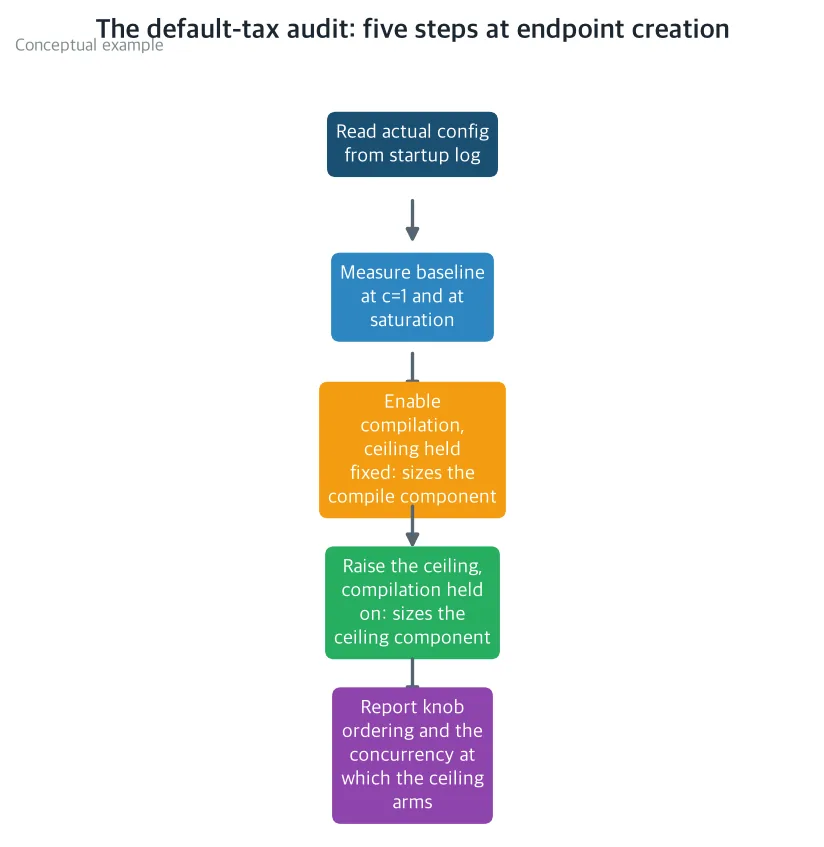 A five-step check any operator can follow when turning on a server. Confirm the settings actually applied from the logs, measure a baseline at both ends of the guest count, then flip one setting at a time to isolate each one’s effect. (Illustrative diagram)
What Came Out
Even a Lone Customer Waited Longer
We measured what happens with a single guest. The untouched kitchen made 7.4 letters per second. The kitchen with only the stove pre-lit made 138.9 letters per second. That’s an 18.8x gap.
In plain terms, pre-lighting the stove alone made serving a single guest more than eighteen times faster. All that relighting and putting out the stove for every dish was costing that much.
What happens when guests pile up? The kitchen with the stove lit and the door wide open made 4,150.7 letters per second with 256 guests at once. The untouched kitchen had flattened out at 231.6 and stopped climbing. The gap there is 17.9x, but read that number as a floor. The wide-open kitchen was still climbing 7.9 percent over its previous step even at the very end, so it had not actually hit its ceiling.
In plain terms, the busier the hour, the bigger the price of leaving both settings untouched.
The Two Settings Do Not Work the Same Way
Measuring the two settings separately turned up something interesting. They do not work the same way at all.
Pre-lighting the stove helped by roughly the same large amount whether there was one guest, eight, thirty-two, or a hundred and twenty-eight: 18.8x, 16.5x, 10.2x, and 10.0x. The reason is simple. In a kitchen that relights the stove every time, the time spent lighting it per dish never shrinks, no matter how many guests show up. Indeed, in the untouched kitchen, output per cook stayed almost flat at 7.4, 6.96, and 7.12 across one, eight, and thirty-two guests. In the kitchen with the stove pre-lit, output per cook actually fell as guests grew: 138.9, 115.2, 72.7. That is exactly what normal batching efficiency looks like when many dishes are cooked together.
The guest cap moved the opposite way. Up to 32 guests, raising this setting made exactly no difference: 1.00x, however you slice it. It only kicked in once guests crossed 32, adding 1.66x at 128 guests and at least 1.79x at each kitchen’s busiest point measured.
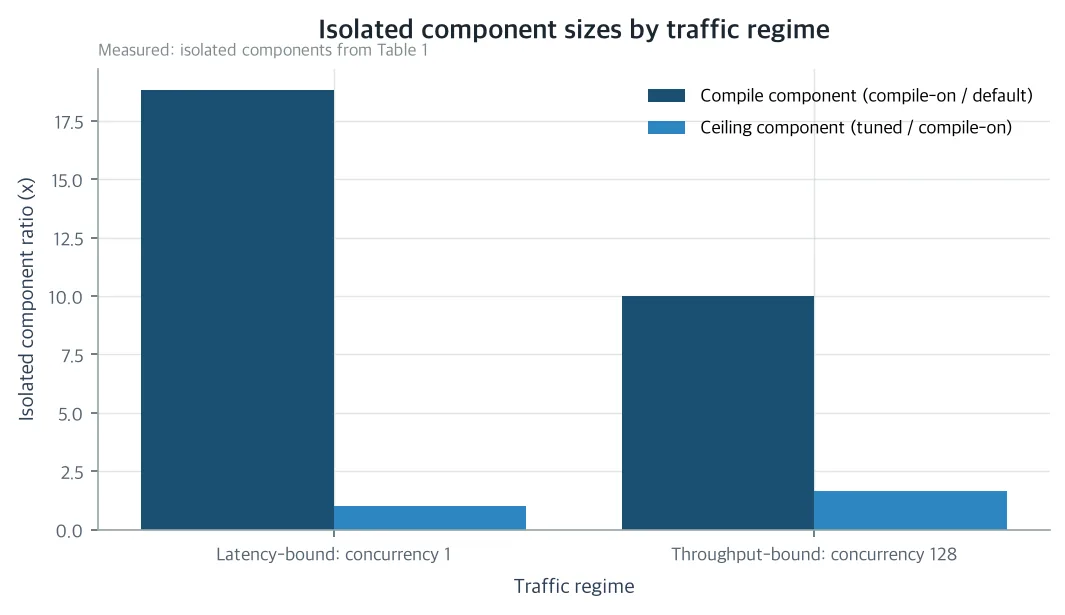 The size of each setting’s effect, isolated by flipping one at a time, for low and high guest counts. Pre-lighting the stove is the larger effect in both cases. The guest cap sits at exactly 1.00x, doing nothing, until guest count crosses the cap, and only then kicks in. (Measured: isolated values from Table 1)
In plain terms, widening the door sign is only worth doing once guests actually cross that line. Pre-lighting the stove is always the first thing to do, and widening the door is the second thing, worth doing only when guests are piling up.
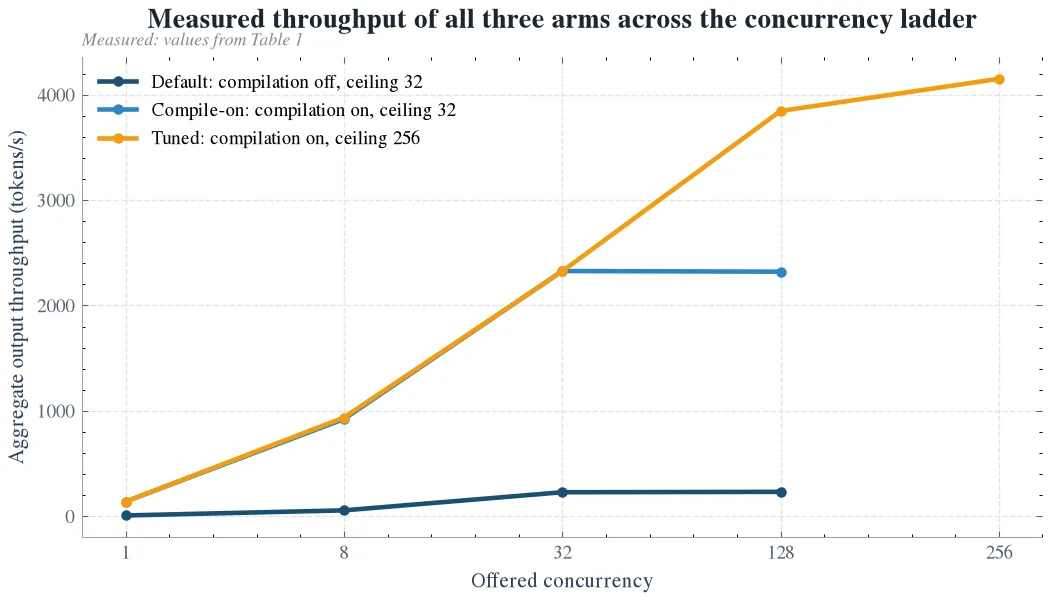 Measured speed by guest count for all three cases. The gap between the untouched curve and the stove-only curve is the stove effect, and the gap above it to the tuned curve is the cap effect. The two lower curves overlap until guest count crosses 32. The tuned curve was still climbing at its last point, so 4,150.7 should be read as where the measurement stopped, not a ceiling. (Measured values)
The paper adds one more rule on top of this. A setting only counts as “applied” if the server itself recorded it in the log when it started up, not just because an operator asked for it. Some other layer in between can quietly change or ignore a requested value, so what an operator believes is running and what the server actually runs can differ. Building on this rule, the paper lays out a five-step check. First, read the real settings from the log, then measure the total loss. Turn on the stove alone to isolate its effect, then raise the guest cap alone to isolate its effect. Finally, report both effects together with the threshold and the startup cost. You can run this on the server you already have, with no new hardware.
What to Change
First, check the real settings on the server you have running, straight from the log. What was requested and what actually took effect can be two different things.
Second, always turn on pre-lighting the stove first. The loss is large whether guests are piling up or not.
Third, only raise the guest cap for a service that really does see guests pile up. The cost of raising it is about a 79-second increase in the time it takes the server to start. If that buys back several times the throughput, it is a good trade.
Our own company, ThakiCloud, has already acted on this. This measurement came from our own real server. Our AI inference service, Metis, will change its serverless endpoints to turn on both settings by default (in engine terms, TORCH_COMPILE_DISABLE=0 and max_num_seqs=256). The more a service runs work automatically through agents, the more it ends up spending on top of this same server. Throughput quietly burned by a neglected setting turns directly into the cost of automation.
This is not only our problem. What a company spends on AI server costs often has less to do with which model it chose than with one unmeasured default nobody looked at. This five-step check needs no new graphics card, and anyone running self-hosted AI serving can apply it to their own server right now. Most existing research on serving speed measures a server that is already tuned. This paper goes the other way and is the first to actually measure, and separate out, how much a neglected default setting costs on its own.
What Not to Trust
This measurement has clear limits. It was measured on one generation of graphics card (B200), one version of the serving program, and one model. It was not checked across many kinds of graphics cards or many models. The shape of the result, two settings combining multiplicatively with one of them acting like a threshold, seems likely to hold elsewhere too, but that has not been confirmed yet.
There are also limits to the measurement itself. The wide-open kitchen was still climbing even as measurement ended, so the 17.9x figure and the 1.79x cap effect are both floors and the real numbers could be larger. The server used for measurement was not a fully isolated environment either. Another graphics card on the same server was handling real guests with the same model, so computer resources and power were partly shared. That could make pre-lighting the stove look somewhat more effective than it truly is, or make overall speed look lower than it truly is. Finally, the idea that, with the stove unlit, the time it takes to light it per dish is the real bottleneck was observed for this specific model-and-program combination. With a different combination, which of the two settings matters more could change.
You can find the paper detail page here: The Default Configuration Tax
Figures in this post were measured on a single B200 graphics card and rounded for readability in the body text. Exact values stay in the figure captions.