A Backup You Have Never Restored Is Hope, Not Proof
This piece is for the developer running a production system alone, with no on-call teammate and no shared dashboard. By the end you will have a test for whether your current backup is real, and a cadence for keeping it that way. The test takes two lines, and the cadence takes one slot on the calendar.
Here is the argument up front. A backup file existing, looking the right size, and appearing in a listing all prove the same thing: a backup once ran. None of them proves that you can roll back. Restorability is not a property of the file. It is a property of the last time you restored. Until you restore on purpose, what you have is hope, and hope is the state most solo production systems quietly sit in.
It is 2 a.m. on a Thursday, and the notification says the payments database stopped responding. You connect to the server: the disk is dead, and the volume holding production data will not read at all. Your mind goes straight to the backup in object storage, the one the nightly script has been dropping in place for months. The last successful file is three months old. The script ran every night since, and failed silently every time because the disk was full. The dashboard you checked each morning showed green, because what it actually verified was that a previously successful file still existed.
 A visual metaphor for the article’s key idea.
The Green That Is Not Today
Backup scripts die in ways that do not announce themselves. The disk fills and there is nowhere to write. A path changes and the script copies an empty folder. A credential expires and every login fails. All of these failures are quiet, because a backup running at 4 a.m. has no audience.
In a team, a dead backup eventually turns someone’s monitor red, and looking at red things is someone else’s job. In a solo system, the person who should look at the red thing and the person doing everything else are the same person, usually at a different screen. Silent failure is not bad luck in this setup. It is the structure. Failures pile up unannounced and arrive all at once, during the incident.
The green you check every morning does not say “today’s backup succeeded.” In most cases it says “a previously successful file still exists,” which is a fact about the past. It can be true this morning, this week, and three months from now, while every new run has failed the whole time. The color stays the same while the time behind it keeps sliding away.
So “we have a backup” and “we can roll back” are two different states. The file exists. The size looks plausible. The listing works. All three checks prove presence, and none of them proves restorability. Mixing up the two is where the 2 a.m. cold sweat comes from. The habit of reading green as proof is what manufactures the incident three months later.
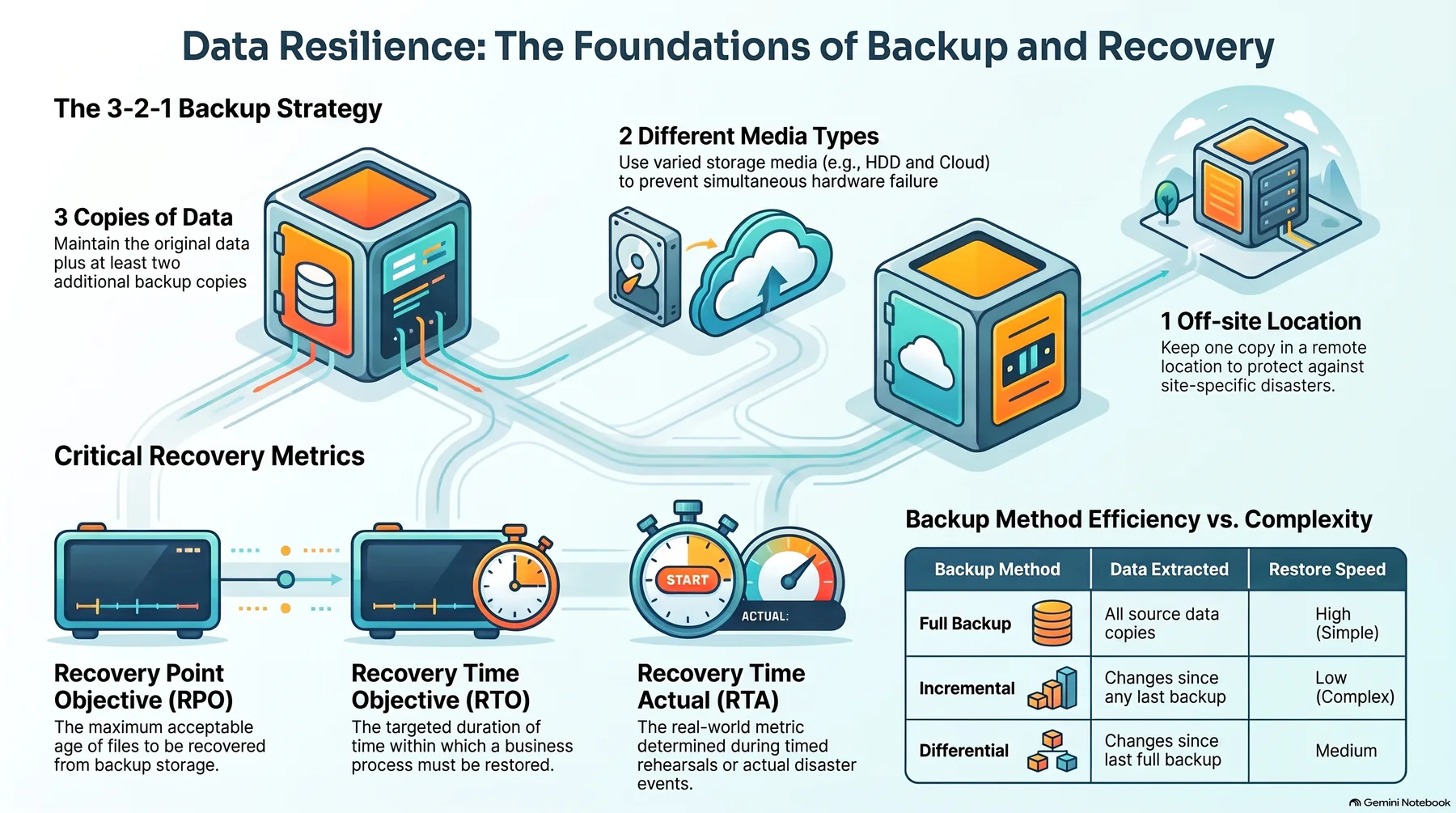 Infographic generated by NotebookLM from the sources.
Backups Die in Four Faces
Even when the file exists, a backup can fail in four distinct ways. Keeping the four separate matters, because each one needs a different defense, and defending against one does nothing for the others.
The first face is vanishing. The script dies quietly, the disk fills, or the target path changes and what gets copied is now an empty folder. Vanishing should be visible in the listing: the absence of the file, by itself, has to become an alert. Not a discovery you make on the day you need to restore.
The second face is corruption. A file written halfway through a power cut, a broken archive, slow rot on an aging disk. The file is there, and it will not open. And the only moment you find out is the moment it must open, the middle of the incident.
The third face is staleness. The backup is intact and restores perfectly, but the moment it restores to is months in the past. Everything accumulated since is gone in one motion. “You can roll back” is technically true and practically indistinguishable from false.
The fourth face is unreadability. The file is fine, but the hand that can read it is gone: a deprecated software version, a format nobody distributes anymore, an encrypted archive whose key was lost. You have the backup. You do not have the reader.
| Face | Typical signal | Defense |
|---|---|---|
| Vanished | missing from the listing | failure alerting |
| Corrupt | fails the moment you open it | integrity checks |
| Stale | timestamp months old | retention policy |
| Unreadable | file intact, tool or key gone | format and key management |
The defenses do not overlap. Vanishing is solved with failure alerting. Corruption with integrity checks, meaning the backup verifies itself after every run. Staleness with a retention policy that keeps older generations alive. Unreadability with deliberate format and key management. A green dashboard and a successful restore are two different checks, and only the second one counts.
Replication Is Not a Backup
The phrase “my data is safe” quietly mixes three different tools: replication, mirroring, and backup. All three protect data. All three fail differently, and the difference decides whether you lose data on a bad day.
Replication and mirroring are real-time copies that follow the original. They share its fate. The same disk dies and both are gone. The same region has an outage and both stop. And when a human makes a mistake, the copy follows in real time.
That last case is the one that matters most. A bad migration or an accidental drop does not stop at the original. It propagates to the replica before you notice anything at all. What replication buys is availability, the system not stopping. What it does not buy is protection against the original being corrupted, deleted, or overwritten.
A backup is the opposite of a following copy. It takes one moment in time and keeps it independently of the original. Whatever happens to production right now, the backup holds a clean past moment. That is the tool that actually saves you from data loss, and it is a different job from the one replication does.
So the two jobs get two tools. Replication for “it does not stop.” Backup for “it can be rolled back.” And each backup layer belongs in a different failure domain from the original. Same host, same region, same account, and it dies with the original. Decide which loss you are defending against first, and only then decide where the backup sits.
The Only Evidence Is a Restore You Ran
The core claim, restated: there is exactly one piece of evidence that a backup works, and it is a successful restore. Creating the file proves presence. Restoring from it proves restorability, and only when it actually happens.
The cadence follows from that. A restore drill has to run as routinely as the backup itself, on the same rhythm. If the backup runs daily, a sample file restore runs daily and checks integrity. A table-level or interval restore runs weekly. A full system restore runs monthly. The three answer three different questions: can it open, can this slice come back, can the system stand up again.
The full restore is the one that counts. Listing files proves presence and nothing else. A full restore means building a fresh instance, loading the backup, starting the app on top of it, logging in, checking that core queries return the values you expect, and writing one record that stores cleanly. If the app does not come up, the backup does not come up. That sentence is the whole drill.
Drills happen only in scratch, in a place you can throw away. Restoring over the original is a restore that, if it fails, loses the original state too. The cheapest version builds a restore-only instance when needed and kills it when done. The most convenient version keeps a small one always on. Either way, the scratch environment must sit outside the production failure domain. Otherwise the drill is meaningless on the one day production is exactly what is down.
The cost is small enough to be absurd. A monthly hour or two of your time and a few dollars of instance for a small system [estimate], in exchange for the worst possible moment disappearing: the first time you ever try to restore, at 2 a.m., with shaking hands and no time. The rehearsed restore is the cheapest insurance available, because the alternative is finding out in the incident.
A Drill Is Proof Only When It Is Recorded
A drill that is not recorded is not proof at all. It is a feeling, last month. The record needs five fields: the date, the moment of the backup you restored, the time it took, which criteria passed, and where it failed. Without the record, next month’s drill starts from zero again, and the zero keeps moving.
Before writing “restore succeeded,” check four criteria. Integrity: the checksum matches and the queries return the values you expect. Time: the measured restore finished inside your RTO. Freshness: the restored data is as current as your RPO promised. Function: the service actually works on the restored data, the app comes up. Miss any one and you had an attempt, not a success.
RPO and RTO have to be numbers, fixed in advance. RPO is the amount of data you can afford to lose, written in time, and it is exactly your backup interval: a nightly backup means up to 24 hours of exposure. RTO is the time from noticing to standing the service back up, and it is only honest when measured in drills, never in incidents. A small booking service has to decide whether losing a day of bookings is acceptable. If a day is ten bookings [estimate], that is a concrete number to accept or to shrink, and the backup interval follows the decision.
The record catches the changes nobody saw. Look at a month of entries: the first full restore passed in 40 minutes [estimate], and the last week’s table restore failed because the backup directory had moved. The move showed up as red on no dashboard anywhere. It showed up only in the drill. Failing before the incident is dramatically cheaper than failing during one, and the record is how the before keeps happening.
Ten minutes a month, five questions. When did the backup last succeed? When did a restore last succeed? If you restored right now, which moment of data comes back? Do you hold the tool that can open it? If it is encrypted, can you pull the key right now? If any answer is “I don’t know,” you are still in the hope state, and the question you have now is cheaper than the one you will have at 2 a.m.
Two Lines Tonight
You do not need to redesign the system tonight. Two lines are enough. Write down when the backup last succeeded, and when a restore last succeeded. One line each, on paper or in a file.
If the second line is blank, your backup is hope. Put the next full restore on the calendar, and write the first three lines of the procedure somewhere you will find them in a panic: create a fresh instance, move the backup in, run the restore. Three lines, and next month there is something to follow.
Give the failure a signal path while you are at it. Four alerts: backup failed, backup stale, verification failed, restore drill overdue. With no signal path, the next silent failure stays silent, and the green keeps meaning the past.
Restorability is not a state you reach. It is a state you maintain, with a daily sample restore, a weekly table restore, a monthly full one, and a record that keeps each of them honest. The cost of each repetition is small. The cost of skipping it is the data itself. If you want the full version of this discipline, what to back up, where each layer sits, and how to keep the old copies alive, packed into one page of diagrams, it is in the ebook that ships with this post.
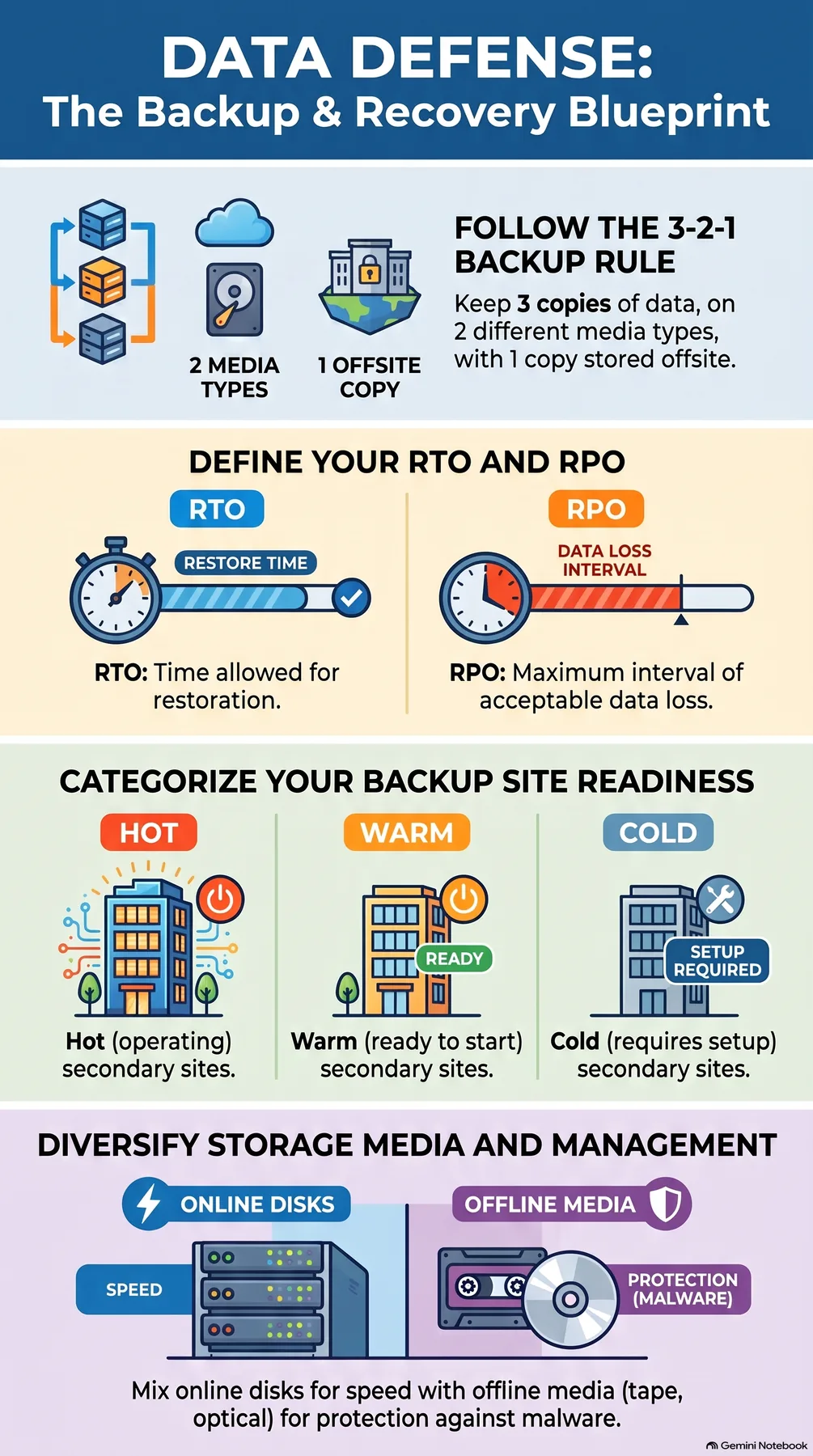 Infographic generated by NotebookLM from the sources.
References
- IT disaster recovery - Wikipedia: defines RTO and RPO, and describes how recovery controls are exercised regularly through DR tests and how regular testing verifies a plan’s effectiveness.
- Backup - Wikipedia: covers backup methods, the difference between backup and mirroring or replication, and restore and data integrity.