Zero-Downtime Migration Isn’t About Moving Things, It’s About Building a Bridge You Can Walk Back Over
If you’re a backend or platform engineer staring down a project to move a legacy service or database onto a new stack without taking anything offline, here’s the one idea worth carrying out of this piece: migrations don’t collapse because the new technology wasn’t good enough. They collapse because at some point in the process, nobody could go back anymore. Zero-downtime migration is won not by speed or an elegant new architecture, but by deliberately preserving the ability to retreat at every step, right up until the moment you decide, on purpose, to give that ability up.
Most teams describe migration the way they’d describe moving apartments: pack the truck, unpack at the new place, done. The reality is longer and more precarious: for a stretch of time far longer than anyone budgeted for, the old and new systems both answer the same questions through different paths, until authority quietly passes from one to the other. What holds that together isn’t how good the new system is, but the fact that after every step there’s still a bridge back to where you started. The one moment that bridge is missing decides the fate of the whole project, and this piece follows that bridge from the first plank to the last.
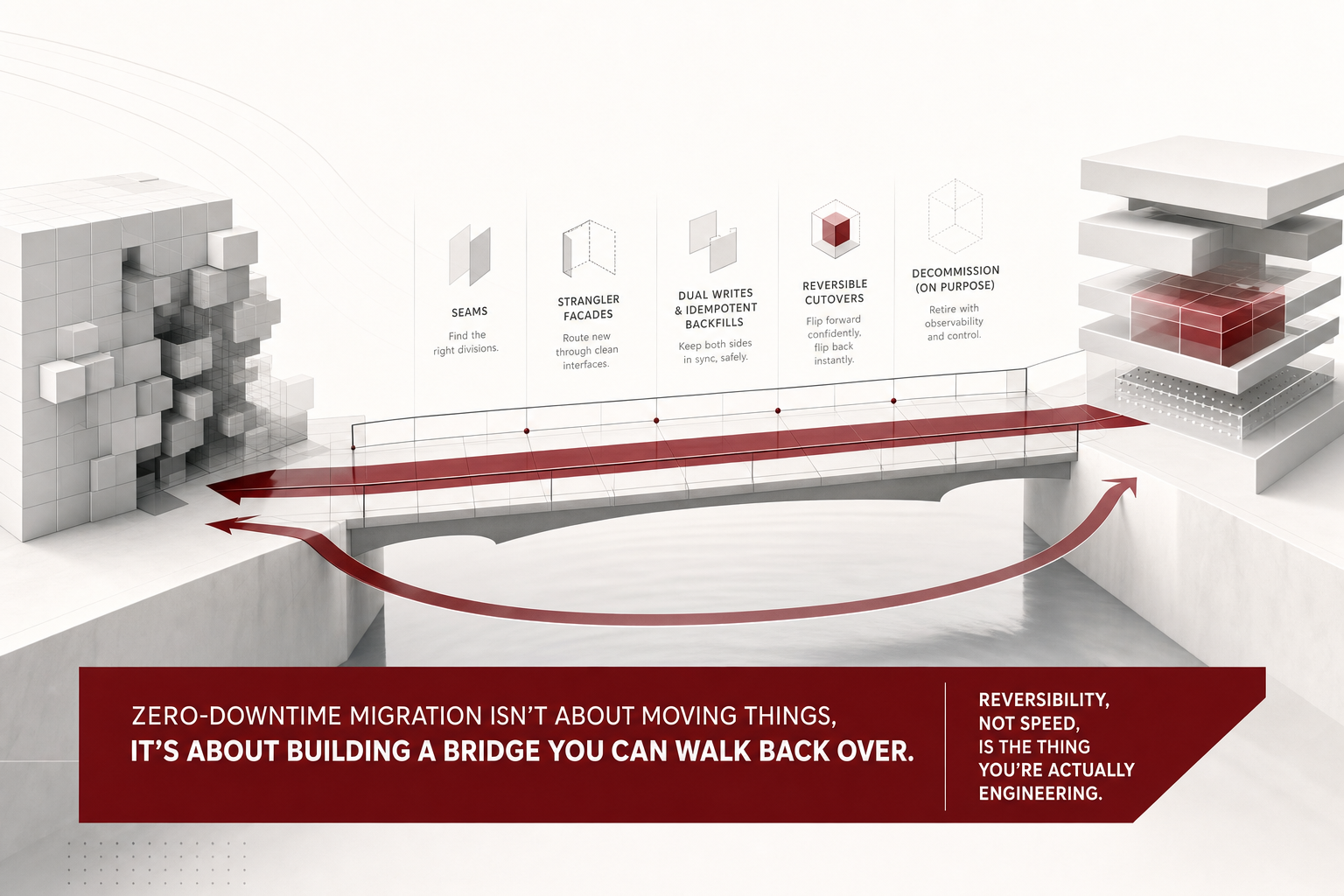 A visual metaphor for the article’s key idea.
Why the Word “Move” Sets You Up to Misread the Whole Project
The word “move” implies a finish line: pack everything up, set it down on the other side, done. But lay out the timeline of a real migration and the period where both systems run side by side eats up most of the calendar. Cutover might take a single afternoon; the preparation that makes it safe, and the observation period after it, run for weeks or months. Frame the project as “moving” and that coexistence period starts to look like waste, so teams feel pressure to compress it, which is exactly the wrong instinct.
Reframe success around reversibility instead, and the picture changes. Success no longer means the new system is better than the old one. It means that if something breaks, you can be back to where you started within seconds. That single shift tells you what to do first, what to defer, and how much time each stage deserves: hard-to-undo steps earn thick preparation, cheap-to-undo steps get tried and iterated on quickly, without guilt.
A bridge exists to be crossed in both directions. Every stage of a migration is a point on it, and standing there, you should always be able to choose whether to keep going or step back. The five stages that follow each build a different stretch of that same bridge.
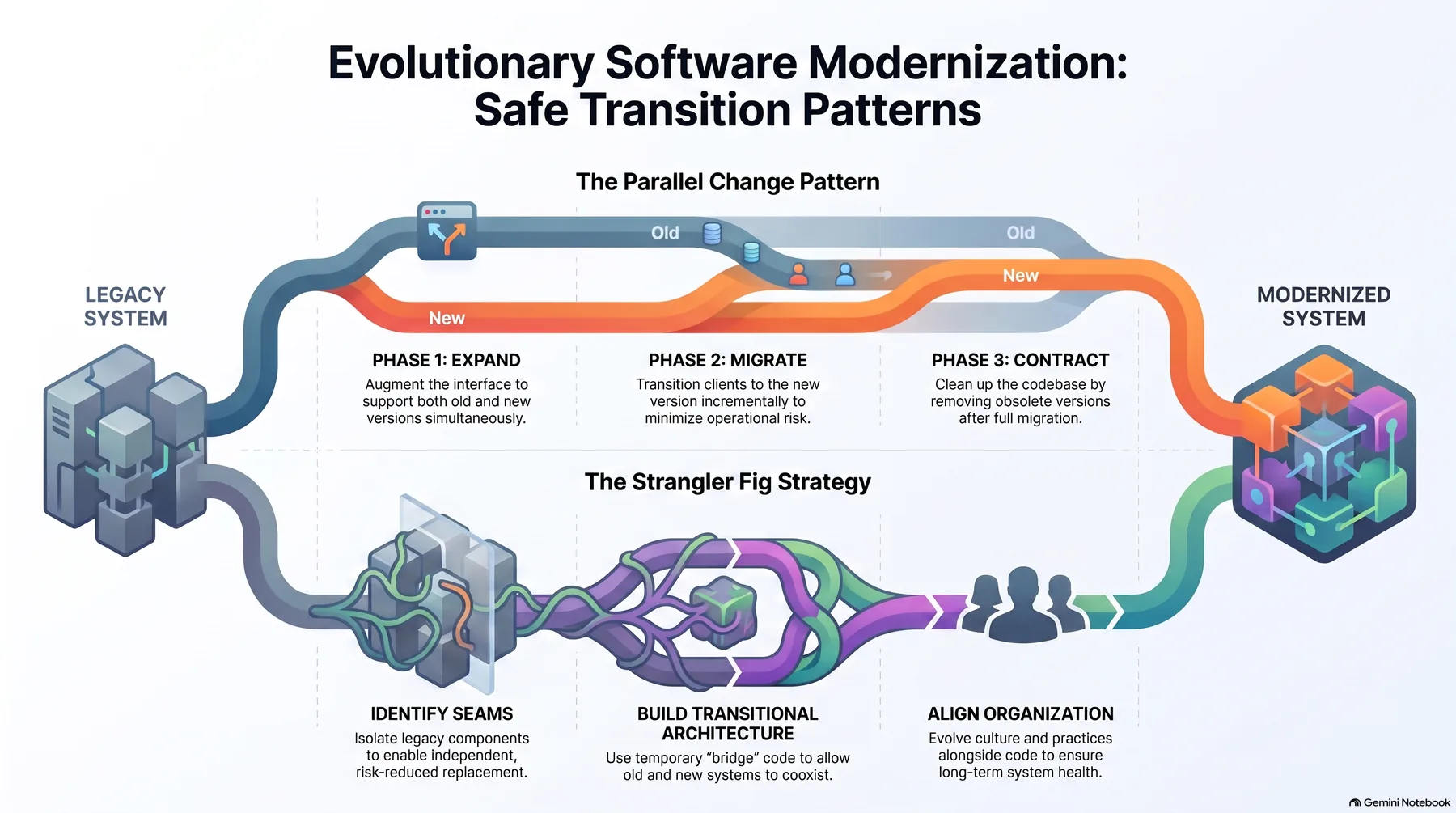 Infographic generated by NotebookLM from the sources.
You Can Only Start Where the Code Already Has a Seam
“Let’s move the payments system to the new stack” sounds like a plan, but it doesn’t actually name anything you can move. Under that label there’s usually an API server, a settlement batch job, an admin dashboard, several loosely related groups of database tables, and a dozen cron jobs nobody remembers writing. Lift that whole tangle at once and zero downtime becomes a contradiction from the start. Cutting it to a size you can actually lift is the real first task of every migration project.
The mistake most teams make is cutting along the org chart or feature spec instead of the code. “Migrate the coupon feature first” sounds reasonable right up until the coupon logic turns out to write directly into the orders table, at which point coupons and orders are already one unit, whatever the spec says. The only places you can legitimately cut are places where the code already lets you swap an implementation without touching the caller.
In practice that’s one of four shapes: a network boundary (an HTTP endpoint, a gRPC service, a queue topic) where callers don’t care what’s behind it; a module boundary, a package already wrapped behind a single interface; a data boundary, a cluster of tables nothing else joins against; or a batch boundary, a job whose input and output are cut off through files or tables rather than shared state. Match none of these four, and it isn’t a migration unit yet.
Where none of those seams exist, the work before the migration is to build one. Pulling out an interface and pushing the existing implementation behind it is refactoring, not migration, and it’s easy to mistake for wasted motion. Skip it and you lose the ability to roll back later, because there’s nowhere physically to roll back to. One rule matters more than any other here: don’t lump reads and writes together under the same table. Almost all of the real difficulty in a migration lives on the write side.
A Facade Is an Observation Device Before It’s Ever a Switch
There are broadly two ways to replace an old system: build the new thing completely and swap it in over a weekend, or put up a thin layer in front and gradually swap pieces in behind it. The first has a simpler plan, at the cost of having nowhere to go if it fails. The second is the strangler pattern, named for the way a strangler fig grows around a host tree until it takes the tree’s place entirely.
The point of this pattern isn’t building a brilliant new system, it’s making sure callers never have to care whether the old system or the new one answered their request. So the first real work isn’t writing new code at all, it’s inserting a layer between callers and the existing implementation. At first this layer, the facade, does nothing interesting: it takes the request, hands it straight to the old implementation, and passes the response back unchanged.
That stage feels boring enough to skip, but it earns you three things you need. Your caller list gets locked down, since anyone not going through the facade is a bug waiting to surface. The real shape of requests and responses shows up in the logs, and it’s remarkable how often that diverges from whatever the spec claims. And you now have a place to hang routing logic once you actually need it.
Where the facade lives depends on the system’s shape: routing rules in a gateway for an HTTP service, a delegating interface for a library call, a relaying consumer for a message-based system, a repository layer or view for database access. Avoid one thing deliberately: don’t use the rollout as an excuse to also clean up the interface. Bundle cleanup and migration into the same change, and when something breaks, you won’t be able to tell which caused it.
Reversibility Is Built Out of Ordering and Idempotency, Not Cleverness
Rerouting a request path is reversible: flip a single config value and you’re done. Data is a different problem entirely. An order that only ever got written to the new store doesn’t come back to the old one just because you rolled the routing back. The goal is simple to state: whenever you cut over or roll back, the two stores need to hold the same facts, and “the same” has to be provable with numbers, not assumed.
Dual writing means exactly what it sounds like: a single write request gets applied to both stores. But turn on dual writes alone and the new store only accumulates data from today forward, and any query touching the past comes back empty. That’s why dual writes and backfill always travel as a pair. Dual writing handles every change from this moment forward; backfill handles everything before dual writing was switched on.
The order determines whether it works. Turn on dual writes first, then run the backfill, never the reverse, or you open a gap where changes landing mid-backfill never reach the new store. With dual writes on first, the overlap is safe precisely because writing the same value twice produces the same result. That property, idempotency, is the one non-negotiable requirement for backfill design: every write is an upsert, never a blind insert, and the field deciding whether to overwrite a row must be the source record’s actual change timestamp, never the time the job ran.
Run backfills in slices, cut by primary key range or creation-time window, so a mid-run failure tells you exactly how far you got. And “backfill complete” should never mean “the job exited with status zero.” It should mean row counts and checksums between the two stores were actually compared and matched.
Write the Rollback Procedure With the Same Weight as the Forward One
Cutover is the shortest moment in the whole migration and simultaneously the one that demands the most preparation. If the earlier stages were done properly, cutover itself is nothing more than flipping a single configuration value. If flipping it feels boring, your prep work was solid. If it feels tense and dramatic, something upstream got skipped.
Most cutover runbooks describe the forward path in exhaustive detail, then add a single line near the bottom that says “roll back if something goes wrong.” That line is useless at three in the morning when something has actually gone wrong. The rollback procedure deserves the same level of detail as the forward one: which commands, in which order, executed by whom, and what specific signal tells you the rollback actually worked.
One item gets left out more often than any other: what happens to the data the new path already wrote before the rollback decision. If dual writes are still active, that data lives in both stores and there’s nothing to worry about. If they’ve already been switched off, that window of data exists only in the new store, full stop. Hence a rule that sounds obvious but rarely gets followed: turn dual writes off only after an observation period has passed, never right at cutover.
A cutover plan worth trusting contains, at minimum: a forward procedure with a check after every step, a rollback procedure written to the same standard in reverse, explicit stop conditions, an observation window, a clear split between the person operating, the person watching dashboards, and the person deciding, and a fallback chain for when the decision-maker isn’t reachable. Splitting those roles isn’t bureaucracy: let one person operate, watch, and decide, and panic can override the plan in real time.
Redefine “Done”: It Isn’t Done Until the Old System Is Off
Most migration projects stop right here. Traffic has moved, the metrics look healthy, and the team has already mentally moved on. The old system stays up “just in case.” A few years later, a server nobody remembers the purpose of is still showing up on the bill.
A legacy system that’s still running isn’t a finished migration, it’s two systems running in parallel indefinitely. Costs double, the security-patch surface doubles, and the context an on-call engineer needs to hold doubles with it. Worse, as long as the old system stays alive, someone eventually bolts a new feature onto it, and the migration has effectively been undone.
There’s exactly one question to answer before turning anything off: is anyone still using this. A grep across the codebase can’t answer that, because the callers that matter most usually live outside the repository: an operator’s local script, a curl command pasted into a wiki years ago, a scheduled analytics query, a partner integration, a forgotten monitoring probe. Worth checking: access logs for caller IPs, database connection stats, firewall logs, auth server logs for tokens still issued, and the batch scheduler for jobs still registered.
A ninety-day window exists because of work that only runs monthly or quarterly. Watch for thirty days and a quarter-end settlement job can die weeks later with no one around who remembers why. For accounting or settlement, four hundred days is safer, since an annual job needs one full pass to reveal itself. Once you’ve found the remaining callers, name an owner for each and get explicit sign-off before that path gets cut.
Tearing Down the Bridge Is What Actually Finishes the Migration
Turning off the old system is also the moment you dismantle every bridge the whole project spent building. From that point on there’s no going back, which is exactly why decommissioning deserves the same rigor as building the new system did. Reversibility was never meant as a permanent safety net; it’s a tool you keep attached for as long as you need it and deliberately remove once you’re confident enough not to. Laid end to end, a migration is really a story of reversibility narrowing, stage by stage, from cheap and instant to impossible.
| Stage | How you undo it | Time to undo |
|---|---|---|
| Introduce the facade | Point the facade config back to direct delegation | Instant |
| Turn on dual writes | Flip the dual-write flag off | Instant |
| Run the backfill | Rerun or abort, safe because it’s idempotent | Instant |
| Cutover, switch reads | Roll back a single routing config value | Instant |
| Turn off dual writes | Only after the observation window closes | Impossible |
| Decommission the old system | Cannot be undone | Impossible |
That table is the argument this whole piece has been building toward. Early decisions, finding seams, standing up a facade, turning on dual writes, are cheap to reverse, so they deserve to be made quickly and adjusted through observation rather than agonized over. Late decisions, switching off dual writes and decommissioning for good, are expensive to reverse, which is exactly why they deserve the slow procedure of an extended observation window and real caller verification.
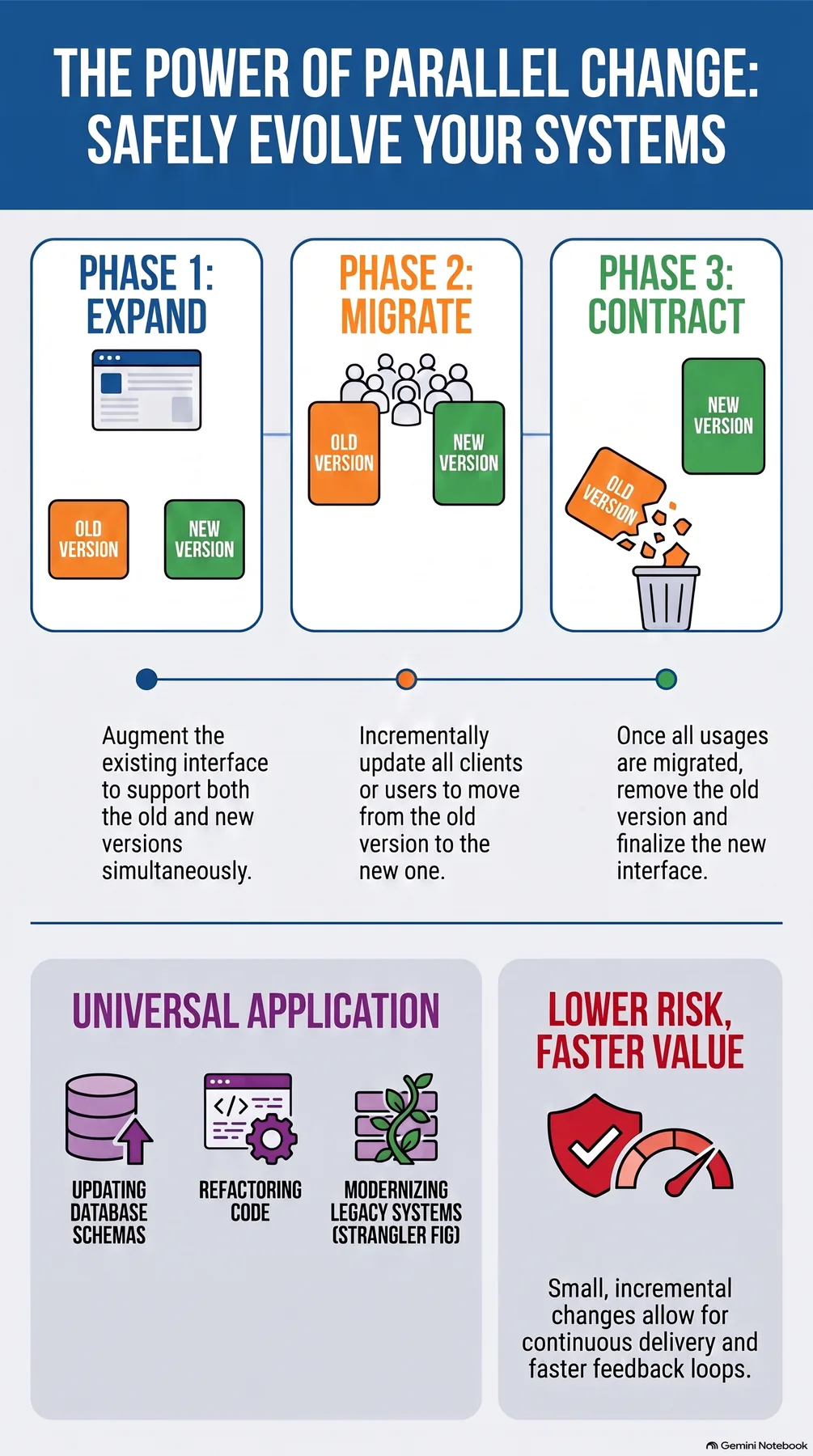 Infographic generated by NotebookLM from the sources.
References
- The origin of replacing a legacy system incrementally behind a facade instead of rewriting it at once. Martin Fowler, “StranglerFigApplication”. https://martinfowler.com/bliki/StranglerFigApplication.html
- The dual-write, migrate, retire-the-old-path sequence is the expand-migrate-contract pattern. Martin Fowler, “ParallelChange”. https://martinfowler.com/bliki/ParallelChange.html
- The actual syntax and atomicity guarantee behind an idempotent “update if present, insert if not” backfill. PostgreSQL docs, “INSERT … ON CONFLICT DO UPDATE”. https://www.postgresql.org/docs/current/sql-insert.html
What actually makes migrations hard isn’t the gap between the old stack and the new one, it’s treating both kinds of decisions at the same speed. Handle the cheap ones with excessive caution and the project drags on forever. Rush the expensive ones the way you’d rush the cheap ones, and you get an irreversible incident. The five-stage procedure this piece has walked through is really just a way of telling those two categories apart and giving each the pace it deserves. If you’re mid-migration right now, the fastest way to decide what’s next is to place your current stage on this table and ask honestly which row you’re standing on.
If you want the full step-by-step version of these five stages, with the checklists and concrete procedures this piece only sketched, the ebook this article is drawn from, Migrating Without Downtime, walks through all of it in order.